 Walk Away
Get it free
For heated moments
Pause before you text back.
One tap from your Lock Screen starts a timer, a slow breath, and a safe place to write the reply that can wait.

The whole pause, in one place.
Most apps give you a timer or a notes box. Walk Away covers the whole moment: step away, breathe, hold the message, and come back when you're ready.
-
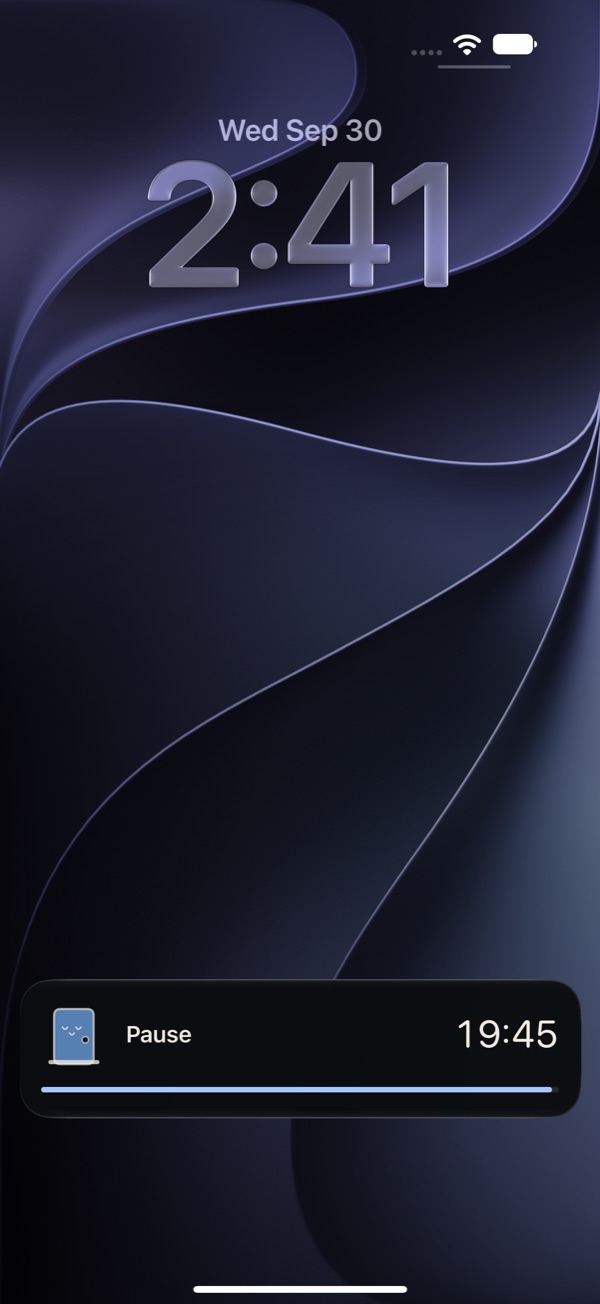 1
Start from anywhere
Say “Hey Siri, start Walk Away,” or use your Lock Screen, Control Center, or the Action Button. A plain countdown follows you onto the Lock Screen, so you can put the phone down.
-
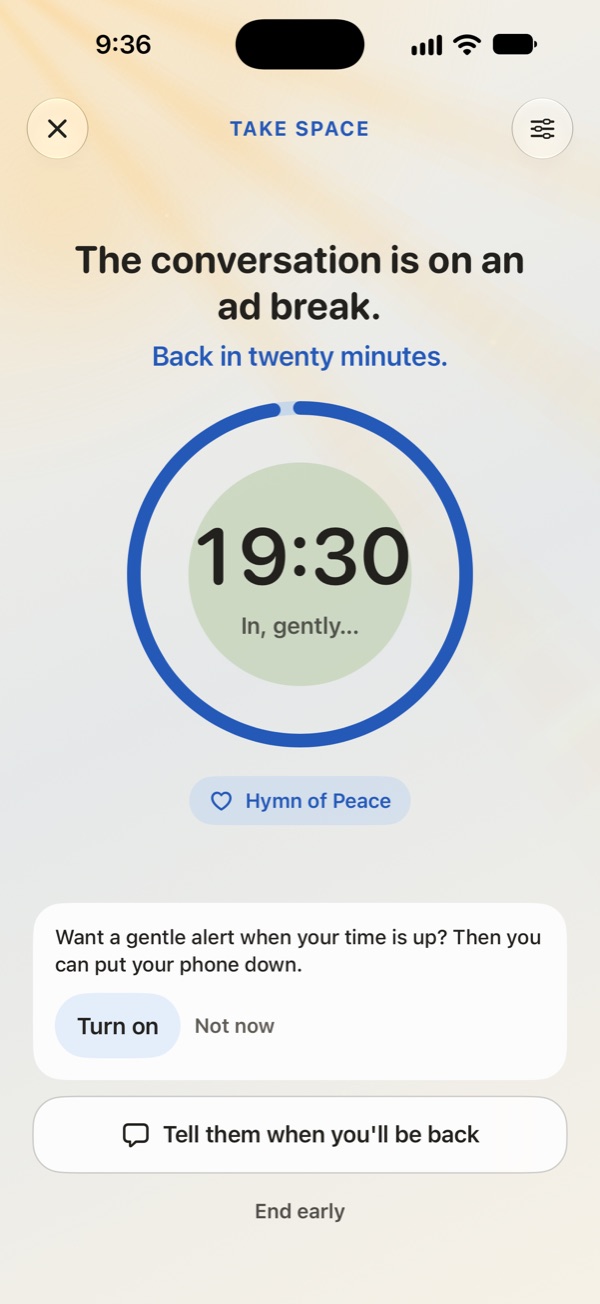 2
Breathe while it counts down
A slow circle to follow, if it helps. Add a sound, like ocean waves that breathe with you, rain, a hymn, or our theme, and watch waves or sunbeams drift behind it.
-
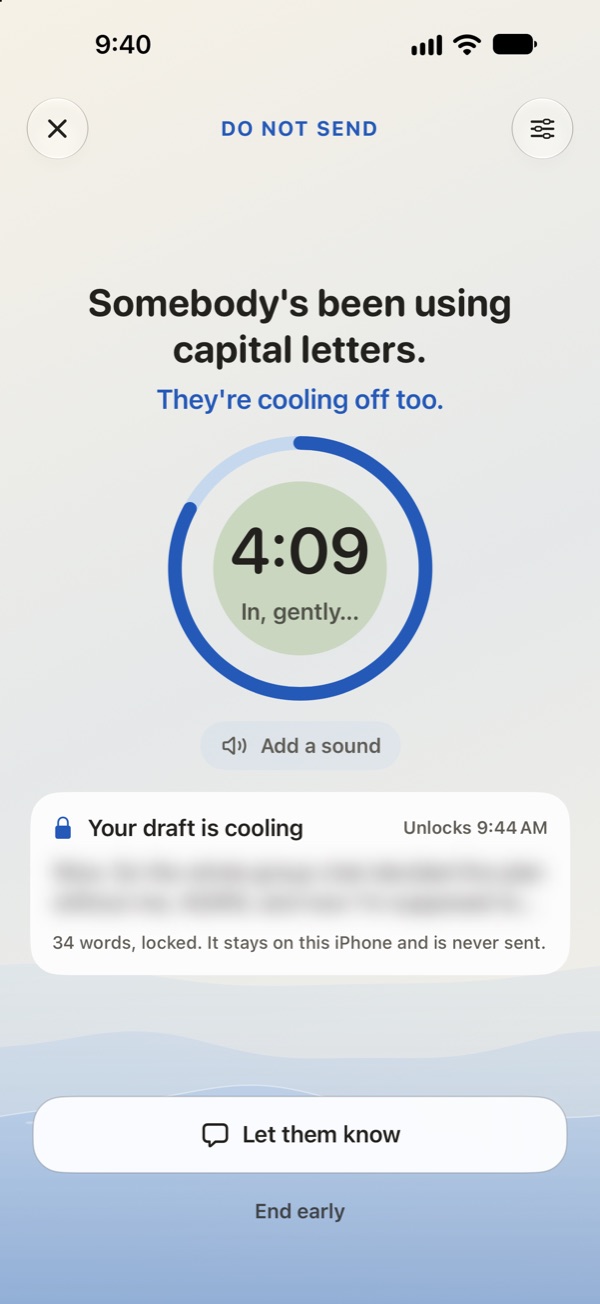 3
Write it here, not there
Write the reply in Do Not Send instead of in the chat. It stays blurred and locked until the timer ends. Walk Away never sends it.
-
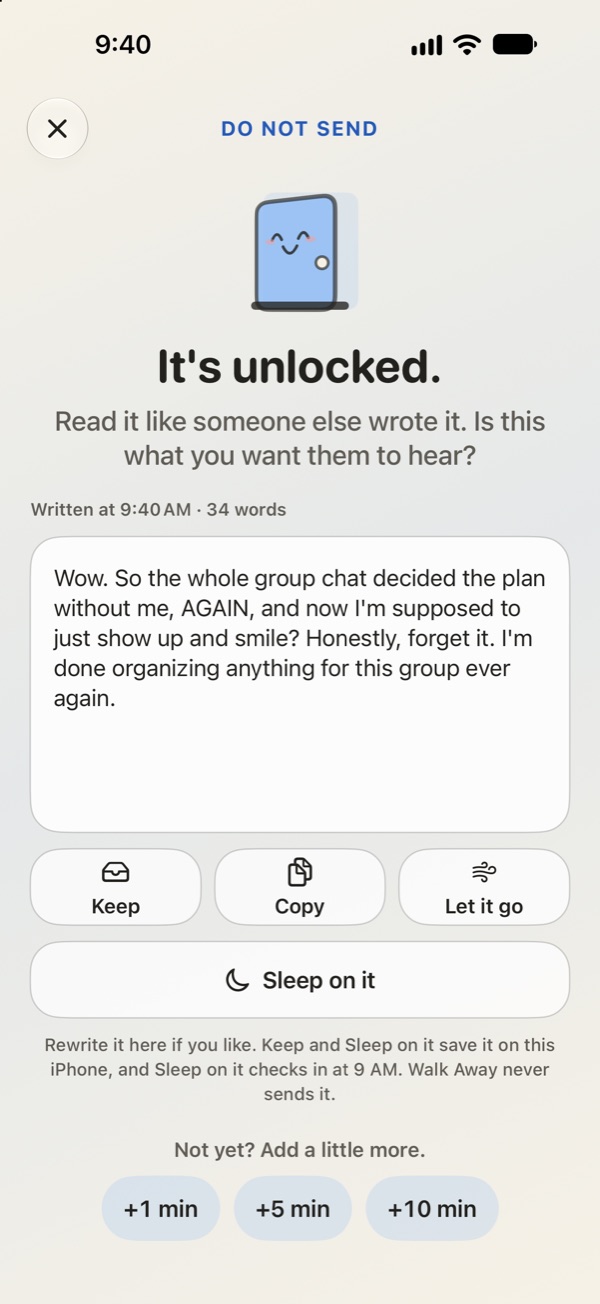 4
Read it again, then decide
Rewrite it, copy it, keep it for a few days, sleep on it, or let it go and watch the words drift away. You decide.
Three pauses. Set your own lengths.
Walk Away
A moment before you reply, when the answer is already typing itself.
Take Space
A real break from the conversation, with words for when you go back to it.
Do Not Send
Write the angry reply somewhere safe and let it cool off before you decide.
A little cheeky. Never at your expense.
The words during a pause are there to take the edge off, not to tell you how to feel. Prefer it straight? Switch to Gentle anytime.
Please hold. Your reply is important to us.Walk Away
Drafted. Not sent. Iconic.Do Not Send
The conversation is on an ad break. Back in twenty minutes.Take Space
Let them know you're coming back.
A pause lands better when the other person knows it's a pause. Walk Away has ready-made messages to copy, share, or say out loud, including a Family gatherings set for the holidays. They ask for time, blame no one, and most say exactly when you'll be back.
Give me a minute. I want to answer this well.Short and neutral
I'm stepping away for 20 minutes. I'm not leaving the conversation. Back at 8:15.A bit of space
I need one minute. I'll be right back.Say it out loud
Your pause stays yours.
What you write in a heated moment is nobody else's business. So Walk Away is built to know as little as possible.
- No account, ads, or tracking.The App Store privacy label says “Data Not Collected,” and that's the whole story.
- Never reads your messages.No contacts access, and no AI reading or rewriting your words. It can't see your chats.
- Drafts stay on your iPhone.Encrypted while your phone is locked, left out of iCloud and computer backups, and deleted after three days unless you choose otherwise.
- Private on a shared phone.The Lock Screen just says “Pause.” Discreet mode shows only “Timer,” and kept drafts can sit behind Face ID.
- Never sends anything.You copy or share a message yourself, when you decide to.
Questions
Is Walk Away free?
Yes. The pause, the breathing timer, Do Not Send drafts, and every one-tap shortcut are free.
Can it stop me from sending a message?
No app can block your texts, and Walk Away doesn't try. It gives you a faster place to go first: write the reply in Do Not Send, and decide what to do with it after the timer ends.
Can it silence my other apps?
Not by itself. iPhone doesn't let apps do that. Walk Away shows you how to set up a Focus that turns on whenever Walk Away is open.
How do I start a pause without opening the app?
Add Walk Away to your Lock Screen or Control Center, assign it to the Action Button, set Back Tap to it, or say “Start Walk Away” to Siri. The app shows you each step.
How can I check the privacy myself?
On your iPhone, turn on Settings → Privacy & Security → App Privacy Report. It lists every connection each app makes. Walk Away doesn't contact any server on its own; the only connections are web pages you choose to open, like our support page.
Is this therapy?
No. Walk Away is a timer for everyday tense moments. It isn't therapy, treatment, or crisis support, and it can't keep anyone safe. If you're afraid of someone, or might hurt yourself or someone else, contact your local emergency number or a free, confidential helpline. You can find one at findahelpline.com.